
Why This Playbook Matters
The snow melts. A homeowner looks at a muddy backyard and decides this is the year. They ask two or three landscape companies to come out for a patio.
A paver patio or a retaining wall costs thousands of dollars. The homeowner has heard stories about patios that sink and walls that lean. They want a company they can trust.
The company that answers first, and books a design visit, usually gets the first walk around the yard. The design visit usually gets the project.
Most landscape and hardscape companies lose projects in three places:
- They talk to every kind of homeowner at the same time.
- They answer enquiries days late, in the spring rush.
- They never offer a bigger project to their maintenance clients and past customers.
This playbook fixes those three places. Do the steps in order. Each step makes the next step work.
Cook does the work in each step. If a thing spends money or goes to a homeowner, it waits for YOU to approve it. See How to approve work.
What you will set up
- One kind of homeowner to go after first, and one offer for them.
- A page that asks your first-call questions and collects the homeowner's number.
- Facebook and Instagram ads in the category Meta requires for your offer.
- A reply to every new enquiry within minutes, and a design visit booked on your calendar.
- Steady projects from maintenance clients, past customers and referral partners, without ad spend.
Step 1: Choose the Homeowners You Want First
Why This Matters
A homeowner who wants a paver patio, a homeowner with a failing retaining wall and a homeowner who wants a full outdoor kitchen ask different questions.
The patio homeowner asks: what will it look like, and will it sink? The wall homeowner asks: is my yard safe, and where will the water go? The outdoor kitchen homeowner asks: can you do the whole space, from design to the last plant?
A page that talks to all of them does not answer any of them well.
Pick ONE group. Then every later step is easier. The page, the ads and the follow-up all use the same words.
What to Do First
- Ask Cook’s Research department to compare two or three kinds of homeowner in your area. Ask what they worry about, what they search for, and what other landscape companies offer them.
- Pick one group. Write your offer for them in one sentence, for example a design visit and a drawing of the new patio before any digging.
- Keep the other groups for later. You can do this playbook again for each one.
I run a landscape design-build company in Boise. Compare homeowners who want a paver patio, homeowners with a retaining wall or drainage problem, and homeowners who want a full outdoor living space with a kitchen and fire pit: what they worry about, what other companies offer them, and which group I should go after first.
Cook writes the comparison. It also writes a one-page offer that you can change. These are the first tasks in a new workspace. See Why is everything locked? and the Research department.
What Cook Found for Stonebridge Outdoor Living
- Start with drainage and walls: Cook suggests you test drainage and retaining-wall inquiries first. These homeowners have an urgent water problem, and the recommendation fits that urgency.
- What these homeowners worry about: They worry about a yard that stays wet, washes out, or holds water near the house. Local competitors reassure them about clear scope, correct preparation, and good sequencing before work starts.
- Lead with an on-site assessment: Cook suggests an assessment offer that finds the water path and plans the fix. Give a written scope, not an invented fixed price. Before you scale, compare qualified estimate requests, site-visit attendance, proposals, gross margin, and signed jobs for each group.
This is Cook’s real answer for a made-up Stonebridge Outdoor Living. Your answer depends on your area.
Step 2: Build a Page That Collects Homeowner Enquiries
Why This Matters
Your ads, your truck signs and your maintenance crews all need one place to send people.
A good page does the first minutes of your call for you. It asks:
- what the homeowner wants built,
- how soon they want it,
- how to reach them.
When the enquiry comes in, you already know who to call first. A person who wants a few bags of mulch does not take a design visit slot.
What to Do First
- Ask Cook for a page with a short quiz. Put one question on each screen. Then the homeowner can answer fast on a phone.
- Ask your first-call questions: patio, wall, outdoor kitchen or full backyard, about how big, about what budget range, when they want to use it, do they own the home, and their phone number.
- Tell Cook what to do with a homeowner who is not ready, for example a person who only wants mowing, or a budget too small for hardscape. The quiz can send them to a different screen, not to your calendar.
- Give Cook your contractor registration number and the exact text that your state requires. Cook puts them on the page.
- Read the page, then approve it. Cook puts it on the internet at a real web address. Cook can also make the photo and the logo.
Build me a page for Boise homeowners who want a paver patio. Ask a few quick questions, one at a time: patio, wall, outdoor kitchen or full backyard, about how big, about what budget, when they want to use it, and their phone number. If they only want mowing, thank them and send them to my maintenance page. Put my Idaho contractor registration number, RCE-12345, at the bottom of the page.
More about pages and forms: Building a lead generating asset.
What the Homeowner Sees
Step 1 of 6
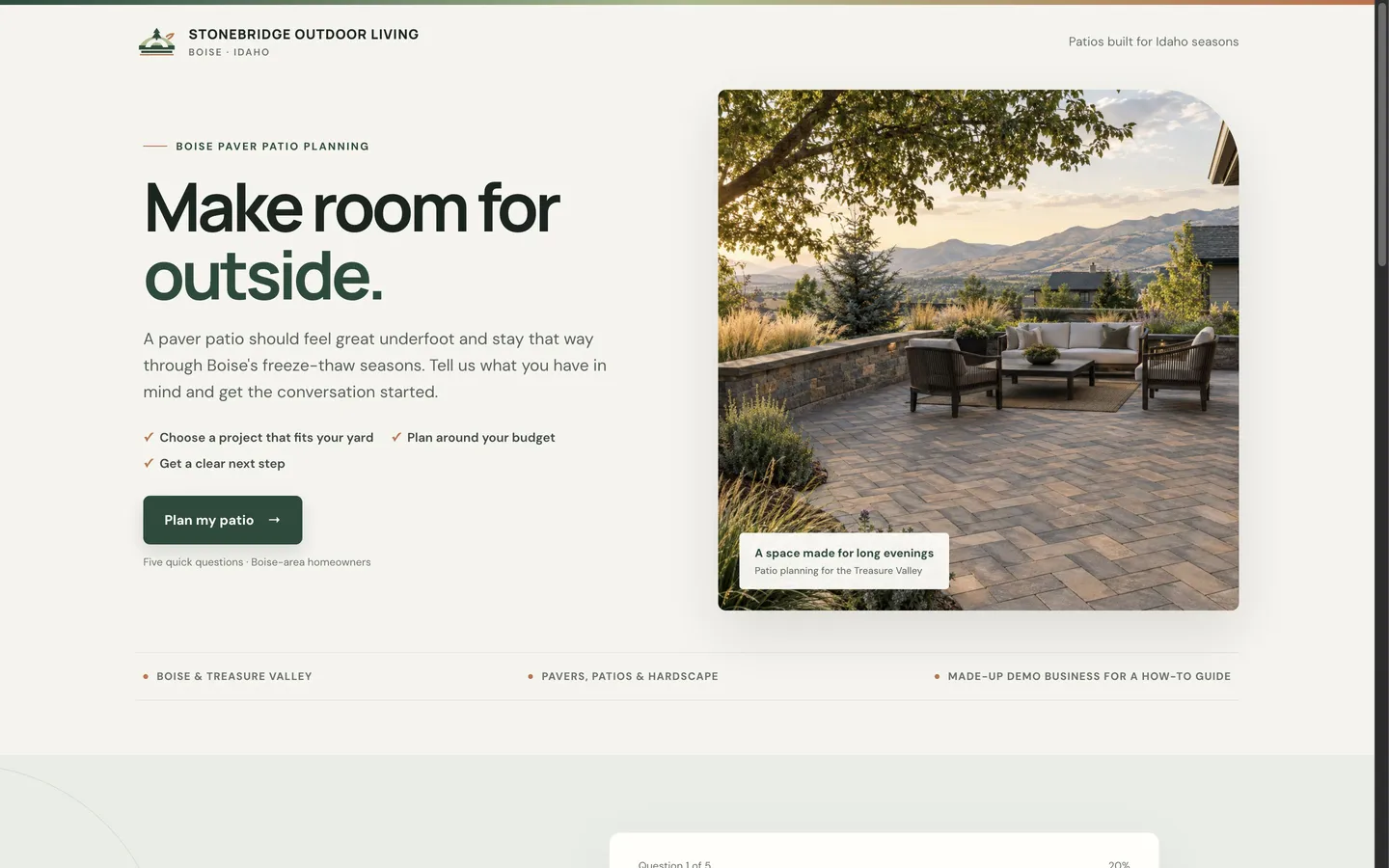
The Page Cook Built
Cook built this page from the request above, for a made-up business, Stonebridge Outdoor Living. Cook also made the photo and the logo.
Step 3: Run Facebook and Instagram Ads in the Right Category
Why This Matters
Some hardscape ads offer monthly payments on a new patio. An ad that offers financing is a credit offer. Meta puts it in the financial products and services special ad category.
In that category, Meta limits how you target people by age, gender and location.
An ad in the wrong category can be rejected. A rejected ad brings no homeowners. So choose the category BEFORE the campaign starts, not after. If your ads do not offer financing, still check the special ad category on the approval card.
What to Do First
- Connect your Meta ad account to Cook. See Cook + Meta Ads.
- Ask Cook to write the ads and set up the campaign. Cook makes the campaign paused. Then it shows you an approval card with the budget and the ads.
- Check the special ad category on the approval card before you approve.
- Want homeowners to stay inside Facebook? Ask for a Meta lead form, not a link to your page. Each form a homeowner sends becomes a lead in Cook. Your follow-up from Step 4 then starts by itself.
- Start before the spring rush. Homeowners plan in late winter. Start with a small daily budget. Cook reads the results. It tells you which ads to stop and where to move the budget. You approve each change.
Write three Facebook ads for my paver patio page. Use before and after photos of our patios. One ad mentions our monthly payment option, so put the campaign in the financial products and services special ad category. Set it up at $35 a day.
Google search ads. If you already run Google search ads, connect Google Ads so Cook can read your campaigns, keywords and spend. Cook does not make new Google search campaigns.
What Your Approval Card Shows
- Campaign
- Boise Paver Patios | Spring
- Daily budget
- $35
- Special ad category
- FINANCIAL PRODUCTS AND SERVICES
- Starts
- Paused
Cook makes each campaign paused. Approving the card creates it, still paused. It starts only when you approve switching it on.
What Real Ads in This Industry Say
We read the Facebook and Instagram ads that 71 businesses like yours are running now, in Meta’s public Ad Library (October 12, 2026). Ads that run for months usually work, so start from what they repeat.
- Free estimate or consultation. This is the default offer in the niche. “Free Consultation & Estimate” (see the ad)
- Years in business as proof. Many ads say how long the company has worked. “Creating beautiful landscapes since 1957.” (see the ad)
- Book now for spring. Off-season ads ask people to book early. “Booking now will get you at the top of our list” (see the ad)
The longest-running ad has run for more than 8 years, and it uses one plain line about water gardens, the town name, and a “Get directions” button (see the ad).
Give these to Cook when you ask for ads, as research, not to copy.
Step 4: Answer Every Enquiry Within Minutes
Why This Matters
This step turns ad money into design visits.
A homeowner who gets a text while they still hold their phone answers it.
In the spring rush, a homeowner who hears back next week has often booked another company already.
What to Do First
- Get a texting number. After you approve it, Cook files the carrier registration for you. See What phone numbers and texting cost.
- Set up a booking page for your design visit, for example one hour in the yard. Add the hours that you are free. Cook sends the homeowner reminders before the visit. If you go over designs on a video call, see Putting a Zoom link on every booking.
- Switch on the AI sales rep for new enquiries. It texts and emails each new homeowner in your words. It asks your questions, books the visit on your calendar, and follows up with homeowners who go quiet. See the Sales department.
- If you want, let the sales rep answer calls to your number. It answers the caller’s questions and books the visit. It does not price the project. You do that after you see the yard.
- Test the follow-up routine before you switch it on. Ask for it as below, then press Test: Cook runs the full follow-up with a made-up homeowner. Then you can read EVERY message first.
When someone fills in my paver patio page, text them within two minutes. Ask when they want to use the patio and to send a photo of the yard. Then book a one-hour design visit with me. Do not give prices by text, tell them I go over the price with the design. If they don’t reply, text again in two days.
Nothing texts a homeowner until you switch it on. A follow-up you have just made is off. It waits until you turn it on yourself, and turning it off stops it at once. See Answering people without doing it yourself.
What the Homeowner Gets
Step 5: Work Your Maintenance Clients, Past Customers and Partners
Why This Matters
Your maintenance crews are in your clients’ yards every week. Many of those clients want a patio, a wall or new lighting. Nobody asks them.
Your past customers want the next part of the backyard. Pool builders, home builders and real estate agents meet homeowners who need a yard.
These groups cost you NO ad money, and they already trust you.
Most landscape companies lose them because nobody keeps in touch after the project.
What to Do First
- Import your maintenance clients, past customers and old leads from a spreadsheet (CSV), or bring them in from GoHighLevel. See Cook + GoHighLevel.
- Give them a reason to talk again, for example spring design visits, or lighting for the patio you built. Cook writes the email or text. It shows it to you before it goes out.
- Ask for reviews. When you finish a project, ask Cook to text the homeowner the link to your Google review page.
- Send one useful email each month to clients and to your partners, for example how to care for pavers after winter. To send from your own address, see Send email from your own domain.
- Post on a schedule. Connect Facebook, Instagram and your Google Business Profile. Cook writes and schedules posts with your finished projects. You approve the schedule. See the Marketing department.
Here’s a spreadsheet of my maintenance clients. Email everyone in February. Tell them we book spring patio and wall projects now, and the first design visits go to our maintenance clients. Show me the email before it goes out.
Check the Numbers Every Week
Each step above changes one number. Look at all of them once a week.
Then change one thing at a time.
Every Monday at 8am, send me last week’s numbers: new enquiries, design visits booked, ad spend and cost per booked design visit.
What a Month Can Look Like
These numbers are simulated. They are for a made-up company, Stonebridge Outdoor Living in Boise, on a $35 a day budget. They show what your Monday report has in it. Your numbers depend on your area, the season, your offer and your budget.
Final Thoughts
- Pick one homeowner group. Write one offer for them.
- Build one page that asks your first-call questions.
- Run ads in the right special ad category. Financing offers go in financial products and services. Start before the spring rush.
- Answer EVERY enquiry within minutes. Book the design visit while they are still interested.
- Offer the next project to clients you already have. Then projects come in without ad money.
Do the steps in this order. Each step gives the next step something to use:
- the page needs an offer,
- the ads need a page,
- the follow-up needs enquiries.
Run an agency with landscaping clients? Do these steps in each client’s workspace. See The Marketing Agency Playbook.