
Why This Playbook Matters
A parent goes back to work in eight weeks. Tonight, with the baby asleep, she fills in the tour form at three or four centers.
The center that answers first, with a tour time, usually gets the first visit. The first visit usually gets the enrollment.
Most daycare and preschool owners lose families in three places:
- They talk to every age group and every parent at the same time.
- They answer tour requests hours late, often after naptime the next day.
- They stop talking to waitlist families, past families and old enquiries.
This playbook fixes those three places. Do the steps in order. Each step makes the next step work.
Cook does the work in each step. If a thing spends money or goes to a parent, it waits for YOU to approve it. See How to approve work.
What you will set up
- One classroom to fill first, and one offer for those parents.
- A page that asks your first-call questions and collects the parent's number.
- Facebook and Instagram ads for parents, and hiring ads in the category Meta requires.
- A reply to every tour request within minutes, and a tour booked on your calendar.
- Steady enrollments from your waitlist, current families and reviews, without ad spend.
Step 1: Choose the Families You Want First
Why This Matters
A parent of a 10-week-old, a parent of a 2-year-old and a parent looking for pre-K ask different questions.
The infant parent asks about safe sleep and ratios. The toddler parent asks about potty training and biting. The pre-K parent asks about kindergarten readiness.
A page that talks to all of them does not answer any of them well. And an ad for a full room brings tours you cannot enroll.
Pick ONE classroom with open seats. Then every later step is easier. The page, the ads and the follow-up all use the same words.
What to Do First
- Ask Cook’s Research department to compare two or three kinds of parent in your area. Ask what they worry about, what they search for, and what other centers offer them.
- Pick the room with the most open seats. Write your offer for those parents in one sentence.
- Keep the other rooms for later. You can do this playbook again for each one.
I run a daycare and preschool center in Raleigh. Compare three groups in my area: parents of infants going back to work, parents of toddlers switching centers, and parents looking for pre-K this fall. Tell me what they worry about, what other centers offer them, and which group I should go after first. My toddler room has 6 open seats.
Cook writes the comparison. It also writes a one-page offer that you can change. These are the first tasks in a new workspace. See Why is everything locked? and the Research department.
What Cook Found for Little Acorns Learning Center
- Start with toddler switchers: Cook recommends parents who switch toddler centers as the first group. These families match the six open toddler seats now.
- Toddler parents want smooth transitions: Cook lists likely worries: will my child settle in, will teachers know their routines, and what are the schedule and start date. Cook says these are guesses to test, not real parent quotes.
- Offer a toddler room tour: Cook suggests inviting families to see the real toddler room and talk about their child’s routines and transition. Cook says not to promise openings, tuition, or outcomes that the center cannot verify.
This is Cook’s real answer for a made-up Little Acorns Learning Center. Your answer depends on your area.
Step 2: Build a Page That Collects Parent Enquiries
Why This Matters
Your ads, your posts and your current families all need one place to send people.
Parents say most center websites hide the tuition, so they must call to find out. They also look up inspection reports before they visit. A clear page with straight answers earns the tour.
A good page does the first minutes of your call for you. It asks:
- the child’s age and start date,
- the days they need,
- how to reach the parent.
When the enquiry comes in, you already know which room and which tour slot.
What to Do First
- Ask Cook for a page with a short quiz. Put one question on each screen. Then a tired parent can answer fast on a phone.
- Ask your first-call questions: the child’s age, the start date, full-time or part-time, which days, and their phone number.
- Show your weekly tuition, or a starting price, on the page. Parents trust a center that does not make them call for it.
- Tell Cook what to do with a parent who is not ready, for example a start date more than six months away. The quiz can send them to a waitlist screen, not to your tour calendar.
- Give Cook your state child care licence number and any text your state requires. Cook puts them on the page.
- Read the page, then approve it. Cook puts it on the internet at a real web address. Cook can make the photo and the logo.
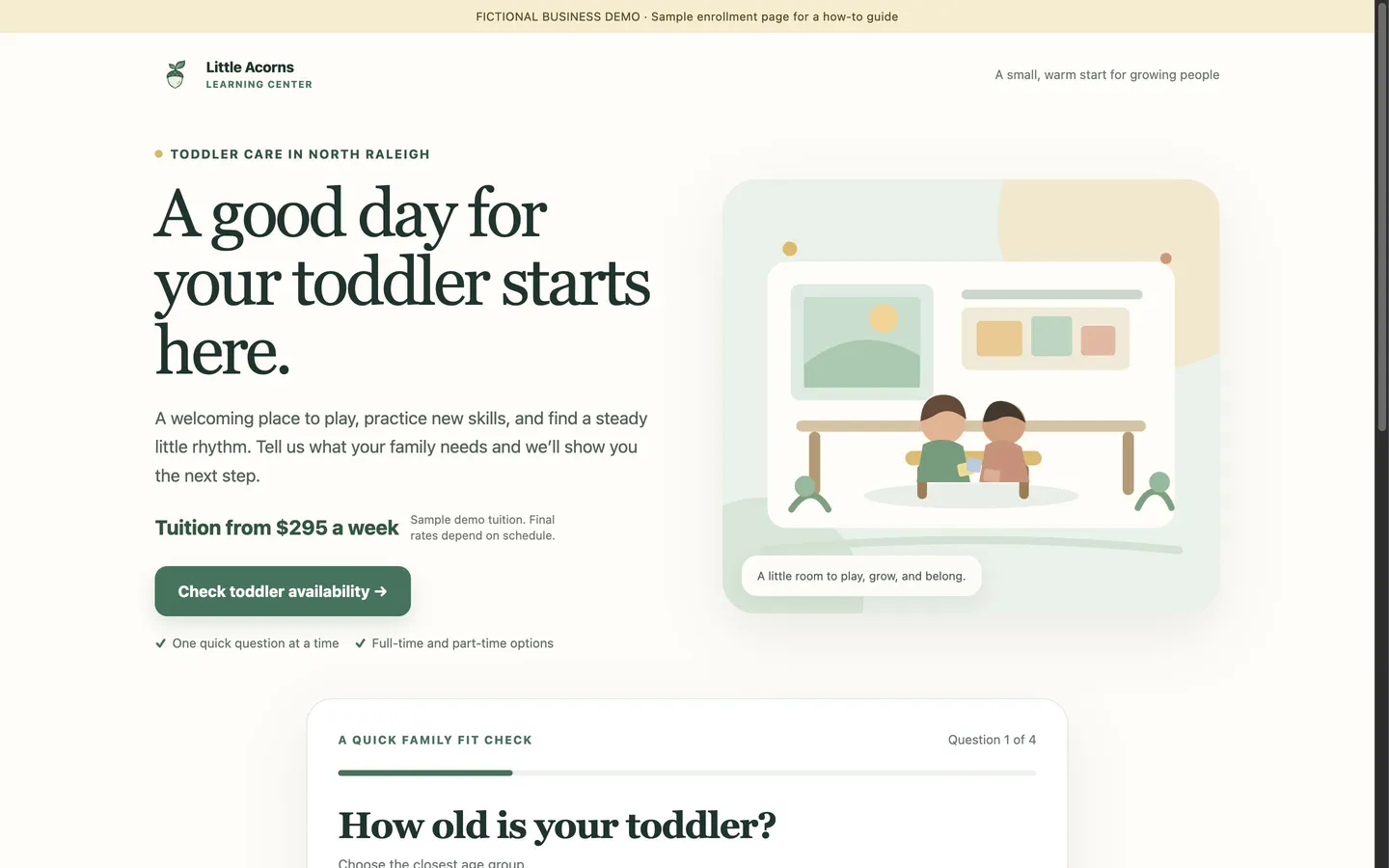
Build me a page for parents of toddlers in North Raleigh. Ask a few quick questions, one at a time: the child’s age, when they want to start, full-time or part-time, and their phone number. Show tuition from $295 a week. If they want to start more than six months from now, put them on my waitlist screen. Put my licence number, 92001234, at the bottom of the page.
More about pages and forms: Building a lead generating asset.
What the Parent Sees
Step 1 of 4
The Page Cook Built
Cook built this page from the request above, for a made-up business, Little Acorns Learning Center. Cook also made the photo and the logo.
Step 3: Run Facebook and Instagram Ads in the Right Category
Why This Matters
A center runs two kinds of ads: ads that fill seats, and ads that find teachers.
You cannot open a room without the teachers to meet the ratio. So most centers need both.
Meta treats the two kinds differently. An ad to HIRE teachers goes in the employment special ad category. In that category, Meta limits how you target people by age, gender and location. An ad in the wrong category can be rejected. So choose the category BEFORE the campaign starts, not after.
What to Do First
- Connect your Meta ad account to Cook. See Cook + Meta Ads.
- Ask Cook to write the ads and set up the campaign. Cook makes the campaign paused. Then it shows you an approval card with the budget, the ads and the special ad category.
- Advertise only rooms with open seats. Name the age group and the start month in the ad.
- Make teacher ads a separate campaign in the employment category. Check the special ad category on each approval card before you approve.
- Want parents to stay inside Facebook? Ask for a Meta lead form, not a link to your page. Each form a parent sends becomes a lead in Cook. Your follow-up from Step 4 then starts by itself.
- Start with a small daily budget. Cook reads the results. It tells you which ads to stop and where to move the budget. You approve each change.
Write three Facebook ads for my toddler room page, for parents within 5 miles of North Raleigh. Set up a campaign at $25 a day. Then write two ads to hire assistant teachers, as a separate campaign at $10 a day in the employment special ad category.
Photos of children need written permission. Use a photo of a real child in your ads or on your page only with the parent's written permission. If you do not have it, ask Cook to make the photo, or show your classrooms and teachers.
Google search ads. If you already run Google search ads, connect Google Ads so Cook can read your campaigns, keywords and spend. Cook does not make new Google search campaigns.
What Your Approval Card Shows
- Campaign
- Little Acorns Teacher Hiring | Employment
- Daily budget
- $10
- Special ad category
- EMPLOYMENT
- Starts
- Paused
Cook makes each campaign paused. Approving the card creates it, still paused. It starts only when you approve switching it on.
What Real Ads in This Industry Say
We read the Facebook and Instagram ads that 124 businesses like yours run now in Meta’s public Ad Library (October 12, 2026). Ads that run for months usually work, so start from what they repeat.
- Ask parents to book a tour. Many centers make the tour the main next step. “Book your tour today!” (see the ad)
- Say you are now enrolling. Many ads say enrollment is open, and some add that spots are limited. “Now Enrolling All Ages” (see the ad)
- Call out local parents by city. Some ads open with the parent’s city name. “Parents in Ogden!” (see the ad)
The longest-running ad is more than 3 years old, and it gives a short pitch on creativity, curiosity and kindness with the line “Fun, Safe, Nurturing Care” (see the ad).
Give these to Cook when you ask for ads, as research, not to copy.
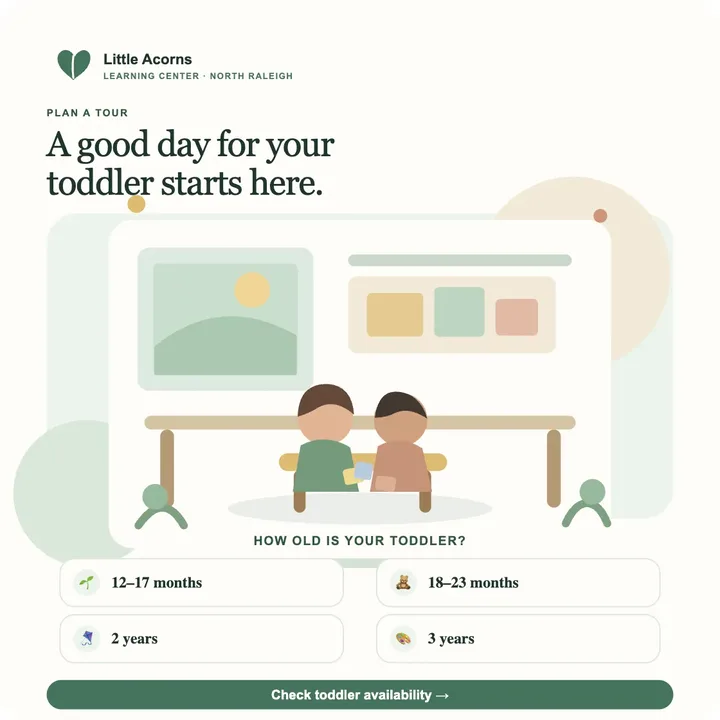
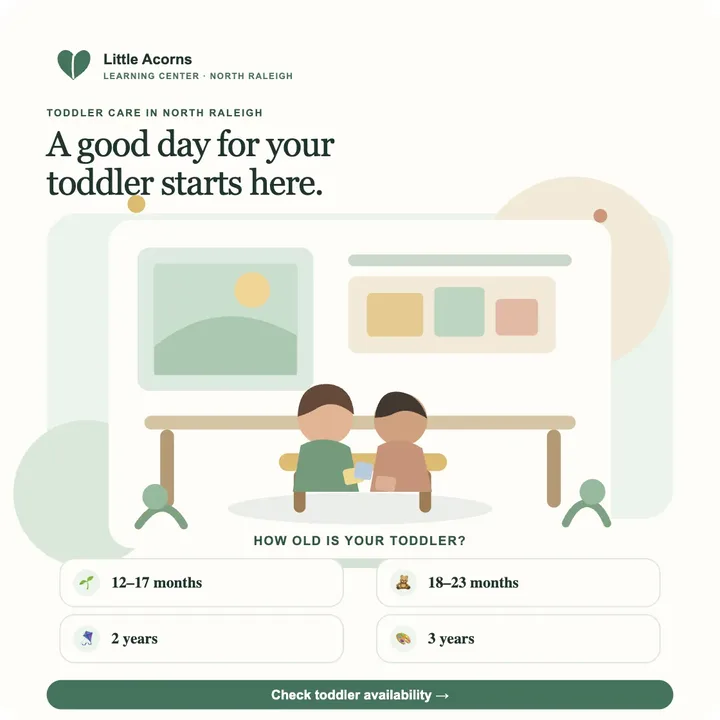
The Ads Cook Made for Little Acorns Learning Center
Cook made these ads from the page after reading the real ads above. Each ad uses the page’s photo, colours and headline.
Step 4: Answer Every Enquiry Within Minutes
Why This Matters
This step turns ad money into tours, and tours into enrollments.
Parents look for care at night, after bedtime. You are busy with children all day and cannot call back until pickup is done.
A parent who gets a text with a tour time while they still hold their phone books it. A parent who hears back the next afternoon has often booked tours somewhere else.
What to Do First
- Get a texting number. After you approve it, Cook files the carrier registration for you. See What phone numbers and texting cost.
- Set up a booking page for tours, for example a 30-minute classroom tour. Add the times that work around drop-off, nap and pickup. Cook sends the parent reminders before the tour.
- Switch on the AI sales rep for new enquiries. It texts and emails each new parent in your words. It asks your questions, books the tour on your calendar, and follows up with parents who go quiet. See the Sales department.
- If you want, let the sales rep answer calls to your number. It answers the caller’s questions and books the tour.
- Test the follow-up routine before you switch it on. Ask for it as below, then press Test: Cook runs the full follow-up with a made-up parent. Then you can read EVERY message first.
When someone fills in my toddler room page, text them within two minutes. Ask their child’s start date and which days they need. Then book them on a 30-minute tour at 9:30 or 3:30 on a weekday. If they don’t reply, email them the next day with our tuition and a photo of the toddler room.
Nothing texts a parent until you switch it on. A follow-up you have just made is off. It waits until you turn it on yourself, and turning it off stops it at once. See Answering people without doing it yourself.
What the Parent Gets
Step 5: Work Your Waitlist, Current Families and Reviews
Why This Matters
Your waitlist is full of parents who already chose you. When a seat opens, they are the fastest enrollment you can get.
Current families have younger brothers and sisters, and friends at the playground. Their reviews are what new parents read before they book a tour.
These groups cost you NO ad money, and they already trust you.
What to Do First
- Import your waitlist, past families and old tour requests from a spreadsheet (CSV), or bring them in from GoHighLevel. See Cook + GoHighLevel.
- Tell waitlist families the moment a seat opens. Cook writes the email or text. It shows it to you before it goes out.
- Ask for reviews. Ask Cook to text your happy families the link to your Google review page.
- Send one useful email each month to current and past families, for example what the pre-K room learns before kindergarten. To send from your own address, see Send email from your own domain.
- Post on a schedule. Connect Facebook, Instagram, LinkedIn and your Google Business Profile. Cook writes and schedules the posts: classroom days, teacher introductions, open seats. You approve the schedule. See the Marketing department.
Here’s a spreadsheet of my waitlist. Text every family with a child who turns 3 before September: we have 4 pre-K seats open for the fall, and they can book a tour this week. Show me the text before it goes out.
Check the Numbers Every Week
Each step above changes one number. Look at all of them once a week.
Then change one thing at a time.
Every Monday at 8am, send me last week’s numbers: new enquiries, tours booked, tours that showed up, enrollments, teacher applicants, ad spend and cost per booked tour.
What a Month Can Look Like
These numbers are simulated. They are for a made-up center, Little Acorns Learning Center, on a $25 a day budget for parent ads. They show what your Monday report has in it. Your numbers depend on your area, your offer and your budget.
Final Thoughts
- Pick one classroom with open seats. Write one offer for those parents.
- Build one page that asks your first-call questions and shows your tuition.
- Run parent ads and teacher ads as separate campaigns. Teacher ads go in the employment category. Start small.
- Answer EVERY enquiry within minutes. Book the tour while the parent is still looking.
- Stay in touch with your waitlist and families. Then seats fill without ad money.
Do the steps in this order. Each step gives the next step something to use:
- the page needs an offer,
- the ads need a page,
- the follow-up needs enquiries.
Run an agency with childcare clients? Do these steps in each client’s workspace. See The Marketing Agency Playbook.